 GlowHalo Tools
Guides › Photos & files
Why is a PDF of phone-photo pages so big, and how small can it safely be?
A form asks you to upload "one PDF, maximum 5 MB". You photograph three pages with your phone, combine them, and the result is far over the limit. The reason is simple: a PDF made from images is essentially a container of pictures, and its size is set almost entirely by the pixel size of those pictures. We measured how much resolution a document really needs, using our image to PDF converter.
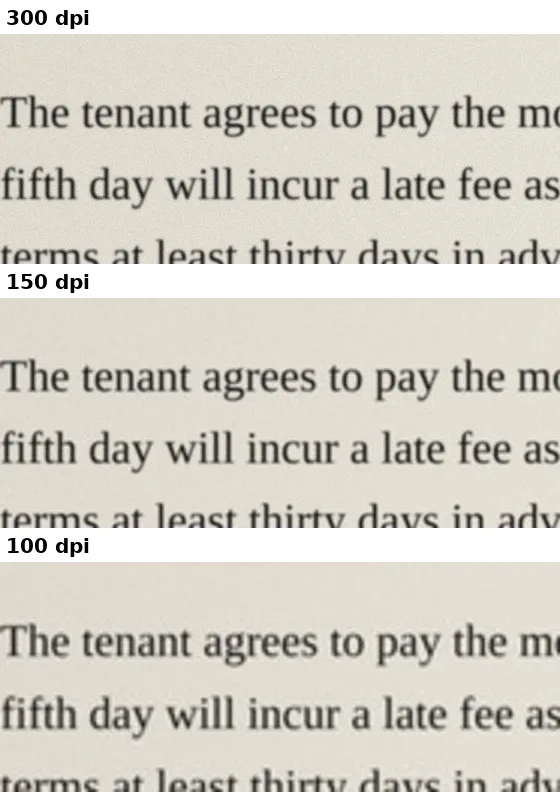
Short answer: three simulated phone-photo A4 pages produced a 7.0 MB PDF at 300 dpi, 2.8 MB at 200 dpi, 1.7 MB at 150 dpi and 0.9 MB at 100 dpi. The body text of our test pages stayed easy to read at 150 dpi. Resize photos to about 1240 pixels wide before making the PDF, and you will usually be under common upload limits. This applies when you build the PDF from images; it does not shrink an existing PDF.
How we tested
We rendered three A4 pages of contract-style text with a table, at the equivalent of 300 dots per inch (2481 × 3507 pixels). To make them behave like phone photos rather than clean scans, we added slight blur, uneven lighting from one side, a warm paper tint and sensor-like noise. We then scaled the pages to 200, 150 and 100 dpi and combined each set into a three-page A4 PDF with our converter.
| Resolution | Page width in pixels | 3-page PDF | Per page |
|---|---|---|---|
| 300 dpi | 2481 | 7.0 MB | 2.35 MB |
| 200 dpi | 1654 | 2.8 MB | 0.92 MB |
| 150 dpi | 1240 | 1.7 MB | 0.56 MB |
| 100 dpi | 827 | 0.9 MB | 0.30 MB |
Halving the resolution cut the size by about three quarters, as you would expect: the number of pixels falls with the square of the width. The noise in a phone photo also costs space, which is why a photographed page is much larger than a clean scan of the same page.
The same test with real scanned pages
To check the pattern on real paper, we repeated the test with three pages from the introduction of the 1859 first edition of Darwin's On the Origin of Species, contributed by the Harvard University Botany Libraries to the Biodiversity Heritage Library and in the public domain (linked in the references at the end of this page). The scans are colour images about 2215 pixels wide, with yellowed paper and slightly uneven print. We prepared the three pages at four widths (the scanned width and three smaller ones), saved them as PNG, and combined each set on the converter's page in Chrome 153 with A4 and the small margin.
| Page width in pixels | 3-page PDF | Per page |
|---|---|---|
| 2215 (as scanned) | 3.49 MB | 1.16 MB |
| 1654 | 2.72 MB | 0.91 MB |
| 1240 | 1.84 MB | 0.61 MB |
| 827 | 1.05 MB | 0.35 MB |
- At 1654 pixels and below, the scans were close to the photo-style pages. Per page they came to 0.91, 0.61 and 0.35 MB, against 0.92, 0.56 and 0.30 MB above. A page about 1240 pixels wide is again a little over half a megabyte.
- The saving from resizing was smaller than the pixel count suggests. Going from 2215 to 1240 pixels wide leaves 31% of the pixels, but the PDF only fell to 53% of its size. The likely reason is that a full-size scan is smooth between the letters, so its extra pixels cost little, while a noisy phone photo pays for every one of them. At full size the photo-style pages were about twice as large per page (2.35 MB at 2481 pixels against 1.16 MB at 2215), partly because they were also wider.
- Each PDF was ready in under a second on a four-core 2.1 GHz Linux machine, from pressing "Create PDF" to the download.
The measured sizes are in a .csv file with one row per width: the PDF size in bytes, the bytes per page and the seconds the conversion took.
How much resolution do you need?
| Purpose | Suggested resolution | Width for an A4 or Letter page |
|---|---|---|
| Email, online forms, reading on screen | 150 dpi | about 1240 pixels |
| Printing at normal size, small print, signatures | 200 dpi | about 1650 pixels |
| Archiving, fine print, documents you may need to enlarge | 300 dpi | about 2480 pixels |
| Quick reference copy, very tight upload limits | 100 dpi | about 830 pixels |
For long-term preservation, archival guidance such as the Library of Congress Recommended Formats Statement favors high-resolution masters that are uncompressed, losslessly compressed or only lightly compressed. For everyday paperwork, 150 to 200 dpi is a sensible balance. A modern phone camera captures around 4000 pixels across, more than 300 dpi for a page that fills the frame, so photos straight from the camera are almost always larger than necessary.
A routine that keeps PDFs small
- Fill the frame with the page. Background around the page is wasted pixels. Crop it out on your phone first.
- Resize to the width you need. Use the image resizer to set the width to about 1240 pixels (or 1650 for printing).
- Combine into one PDF. Add the images to the image to PDF converter in the right order and choose A4 or Letter.
- Check the result. Open the PDF and zoom to 100% on the smallest text, such as dates or reference numbers. If it is clear, you are done.
If you only need to reduce the image files themselves, for example to attach photos separately, the image compressor can lower JPEG quality as well as size.
Why the converter cannot make it smaller on its own
Our converter embeds each image as a JPEG at 92% quality, one image per page, and does not change the pixel dimensions. That keeps your pages exactly as sharp as the photos you provide, but it means the PDF size follows the photos: a stack of full-size camera images makes a large PDF. Resizing first is the step that controls size. Transparent areas in PNG images are filled with white, since JPEG has no transparency.
Upload and email limits
Limits vary by site, but common ones are a few megabytes for government and job application portals and 25 MB for Gmail attachments; larger files are sent as a Drive link instead. At 150 dpi a photographed page is roughly 0.5 MB, so a 5 MB limit allows about nine pages and a 2 MB limit about three.
Common questions
Will reducing resolution make the PDF unacceptable to an official form?
Most forms only require that the content is legible. If a site states a minimum resolution, follow it; otherwise, in our test pages the text stayed easy to read at 150 dpi, but check with the receiving office if you are unsure.
Should I convert the page to black and white?
A black-and-white or greyscale scan can be much smaller, but it can also make stamps, signatures in blue ink or highlighted areas hard to see. Keep colour for documents where colour carries meaning.
Are my documents uploaded?
No. The converter builds the PDF in your browser, so sensitive papers such as contracts and IDs never leave your device.
References
- Gmail Help: Attachment size limit (25 MB)
- ISO 32000-2: PDF 2.0, image XObjects and DCTDecode filter
- Library of Congress: Recommended Formats Statement, still images
- MDN: HTMLCanvasElement.toBlob() quality parameter
- Internet Archive: On the Origin of Species, 1859 first edition (scan from the Biodiversity Heritage Library)
Written and checked by Ria Kim for GlowHalo; figures without a source link come from the steps shown on this page. Companion tool: Image to PDF. Spotted an error? Write to help@glowhalo.org. Chrome is a trademark of its owner; GlowHalo is not affiliated with it.